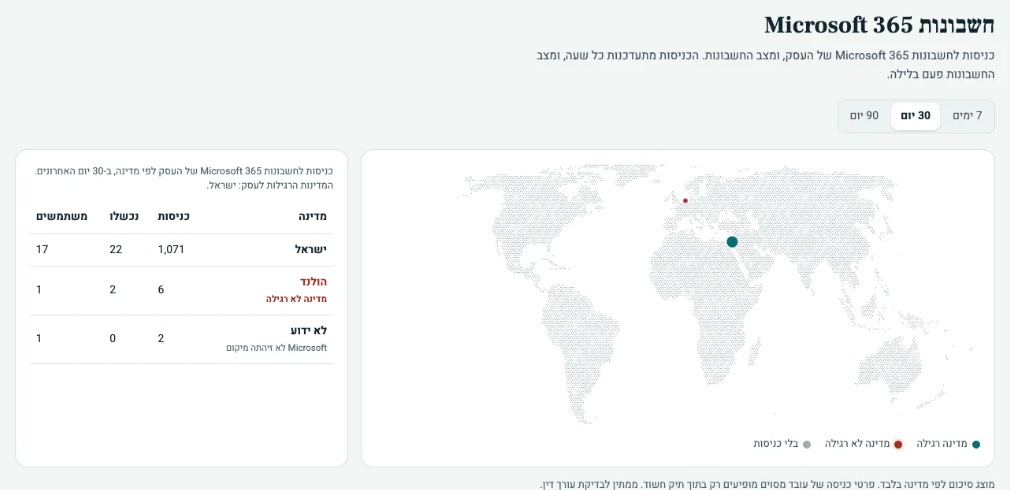
A sign-in from a suspicious location
An employee's account is opened in the middle of the night from a country the business doesn't work in.
Privacy and information security for businesses
Choma organizes your privacy obligations, and the Shomer's AI agents work around the clock to detect suspicious activity in your accounts and email. Choma reviews every finding, and you know exactly what to do. You run the business. We keep watch.
See the plansThe problem
Most incidents don't start with a sophisticated breach, but with a small change nobody noticed.
An employee's account is opened in the middle of the night from a country the business doesn't work in.
Emails with invoices are quietly forwarded to an outside address.
The account's key safeguard was turned off, or an unknown device was added.
One click on "Allow" gives an unknown app ongoing access.
It looks legitimate, and the employee isn't sure whether to click.
Illustrative examples with fictional data.
The Shomer
The Shomer watches for suspicious activity and gives you a clear picture of what's happening in your business accounts and email.
Illustration with fictional data.
Every employee's account: sign-ins, mailbox settings and permissions. The Shomer connects to Microsoft 365 or Google Workspace with read-only access, without reading email content.
A successful sign-in from an unexpected country, or a run of failed password attempts.
A new mailbox rule forwards mail outside or hides it.
MFA was turned off, or a new verification device was added.
A user approved an unknown app to read mail or files.
The employee forwards it to a dedicated address, from any email provider, and gets an answer.
The Shomer's agents turn every suspicious event into a clear finding, at any hour. Serious ones reach Choma immediately and Choma reviews them. Decisions about actions in your accounts, such as signing a user out, stay with you, with clear steps.
Every finding is kept in the portal: when it was detected, what was checked and what was done. At month end you get a clear report on what happened and what needs attention.
Agents around the clock
The Shomer runs on AI agents that work around the clock, seven days a week. They don't sleep, don't take holidays and don't miss small changes, so you hear about a risk early, before it becomes a problem.
And you're never on your own: behind the agents stands Choma, reviewing every finding and staying with you until it's handled.
How Choma works
Privacy and security aren't managed separately. What gets organized in stage two is what guides the handling of every finding.
Get to know the business: what data you hold, who accesses it, which privacy requirements apply and where security stands today.
Prepare the documents and procedures you need while the Shomer watches for suspicious activity in accounts and email.
The portal and monthly report bring compliance status and security activity together in one place, all year round.
Plans
Choose the level of guidance and monitoring that fits your business.
Selected plan
Choma PrivacyChoma Privacy + Monitoring
Mapping, documents, procedures and ongoing guidance.Everything in Choma Privacy, plus the Shomer.
Pricing depends on the plan, your security level and the number of users. The intro call is free.
Why Choma
The Shomer doesn't decide alone. Choma reviews every finding before the final answer reaches you.
We don't access your computers or read your email content. Access is granted and revoked by your account admin.
No jargon. Every finding comes with a simple explanation and clear steps for you and your IT person.
When something happens, you follow the incident procedure Choma prepared for your business, and every step is recorded.
What we don't promise: nobody can guarantee there will never be an incident. What you do get: you'll know sooner when something happens, and you'll have a documented record that you acted. Choma also doesn't give legal advice.
FAQ
Didn't find your answer? We're happy to talk it through.
Book an intro callBusinesses that hold personal data about clients, employees or patients, such as accounting firms, law offices, insurance agencies and clinics. Your obligations under the regulations depend on the type of data and how many people it covers, not on headcount.
Choma Privacy organizes your privacy obligations: mapping, security level, gaps, documents, procedures, employee training and ongoing guidance, with a Hebrew customer portal. Choma Privacy + Monitoring includes all of that and adds the Shomer: AI agents that work around the clock monitoring suspicious activity in Microsoft 365 and Google Workspace accounts, employee suspicious-email reporting and a monthly report.
Yes. The Shomer connects to both and follows sign-ins, mail forwarding rules, two-step verification changes and app permissions. Some checks depend on your licence; for example, Microsoft 365 sign-in logs require Microsoft Entra ID P1 or above. We'll check what's available to you in the first call.
Yes. Reporting works with any email provider: the employee simply forwards the suspicious email to a dedicated address and gets a reply. Nothing to install.
An organized view of the month: what was detected in your accounts, how many emails were reported and what they contained, what was handled and what still needs attention, and the status of your documents and procedures. That record also helps with the regulations' requirements for handling and documenting incidents.
No. The portal is in Hebrew and written for business owners, not security specialists. Every finding comes with a plain explanation and what to do now, and every task has an owner: Choma, you, or your IT person.
It starts with a roughly 20-minute call: what data you hold, who accesses it and where it lives. By the end you know your security level under the regulations and what's missing, and then the documents and procedures are prepared. This usually takes 2–4 weeks. The engagement itself never requires access to your computers or client data.
The Shomer's agents detect the activity immediately, at any hour, and open a finding. A high-severity finding reaches Choma as soon as it's detected, not at month end, and Choma reviews it. You get a plain-language explanation and clear steps under your incident procedure. The Shomer doesn't change settings in your accounts itself: actions such as signing out an account are done by you or your IT person, and response times are set in the service agreement.
No. Nothing is installed on your computers. The Shomer gets read-only access through an app your account admin approves and can revoke at any time. It sees sign-in logs, permission changes and mailbox settings, not the content of your email. An email is only examined when an employee forwards it for checking.
No. Choma doesn't give legal advice. We do the practical side: mapping, documentation, procedures, tracking and monitoring. When a legal question comes up, we say so and refer you to a lawyer.
Yes. The Shomer's AI agents run around the clock, seven days a week, following your accounts and checking reported emails. A serious finding reaches Choma immediately, Choma reviews it, and you or your IT person get a message with what to do. Response times are set in your service agreement.
The intro call is free with no commitment. If you'd like to continue, you'll get a clear quote based on the plan, your security level and the number of users.
Let's talk
Choma helps you manage your privacy obligations and keep a clear view of suspicious activity in your business. In a 20-minute intro call we'll see where you stand and what the first step is. No cost, no commitment.
We reply within one business day.